Compositor for Windows & macOS release 0.9.2 is now available! 🎉
This quality-focused patch release adds a status line to the source editor, improves package compatibility, and fixes several issues with editing, scrolling, and typesetting. It also fixes excessive CPU usage on Windows.
What’s New?
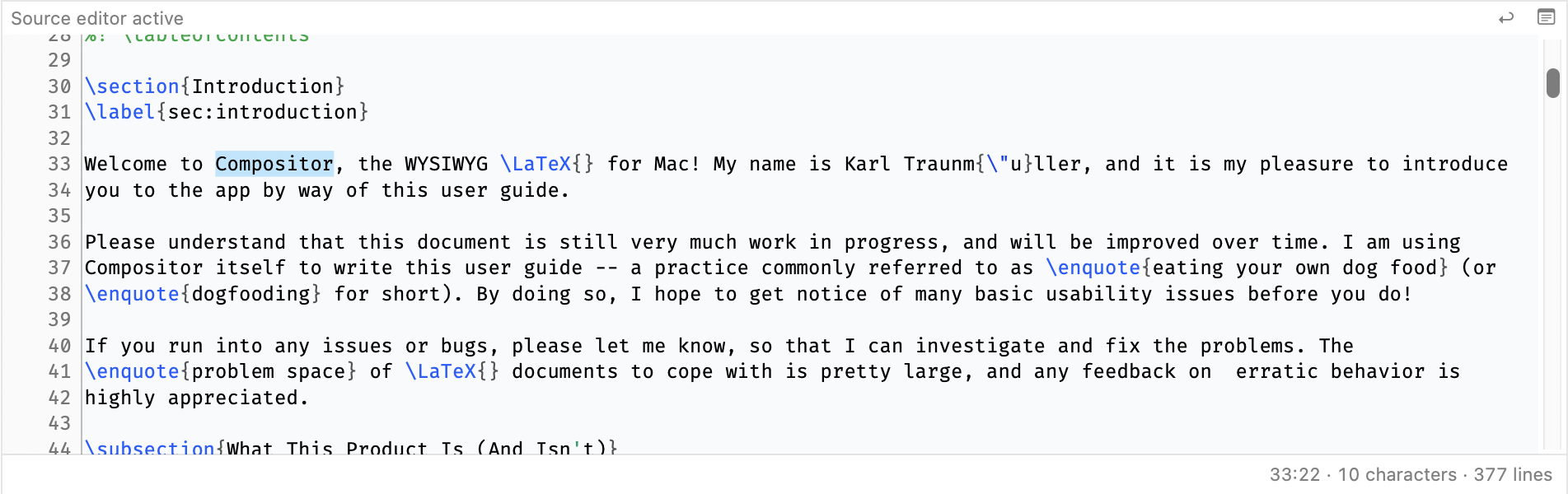
Source Editor Status Line #714
A new status line at the bottom of the source editor shows the current line and column, the total number of lines in the document, and the length of a selection if there is one:
Smaller Improvements
- Packages are now downloaded from the TeX Live 2018 mirror to match the capabilities of Compositor’s typesetting engine #715
Bugfixes
- Fixed excessive CPU usage on Windows, where a run loop integration bug could keep one CPU core running at up to 100% #793
- Fixed leaked stream handles during incremental typesetting #788
- Replacing selected text in the visual editor now preserves the surrounding formatting command, such as
\textbf{...}#789 - Scrolling after page edits no longer unexpectedly jumps back to page 1 #792
- Fixed incorrect caret positioning after a full typesetting pass #791
- Avoided unnecessary full typesetting when scrolling forward after page edits #790
Other
- Added basic usage telemetry #784
- Added a limitations section to the homepage to help you assess whether Compositor suits your documents #249
Try it Out!
Prerequisites (Windows only)
For the time being, I am using a self-signed certificate to sign the Windows app installers. If you want to install a preview build, you will need to install my self-signed certificate (once) by following these steps:
- Download and double-click the certificate file: Compositor.cer
- Click “Install Certificate”
- Choose “Local Machine”
- Select “Place all certificates in the following store” → “Trusted People”
- Complete the wizard
Future production releases will use a standard code-signing certificate, so these steps will no longer be necessary.
Windows Installers
Compositor for Windows is distributed as an MSIX installer to provide a modern installation experience:
- Intel/AMD installer: Compositor-Windows-x64-0.9.2.msix
- ARM installer: Compositor-Windows-arm64-0.9.2.msix
(requires Windows 10 or newer)
macOS Installer
macOS builds are provided using the same codebase and versioning as the Windows version:
- macOS disk image: Compositor-macOS-0.9.2.dmg
(requires macOS 12.0 or newer)
Your Feedback is Much Appreciated!
Any sort of feedback is much appreciated! You can reach me by email at support at compositorapp dot com.
Next Up
You can follow planned work in the Compositor 0.10 milestone, which includes improvements to code completion, the addition of basic crash reporting, among other things.
Stay Informed
Follow @compositorapp on Mastodon or
Bluesky for news and updates
about Compositor for Windows & macOS!